
Free gym tracker · No ads · No trial periods
The fastest way to log your sets.
Same set? One tap. PinRep remembers what you lifted last time, so you're back to resting in seconds.
Works on Android and iPhone. Nothing to download from an app store.

Log a set in three steps
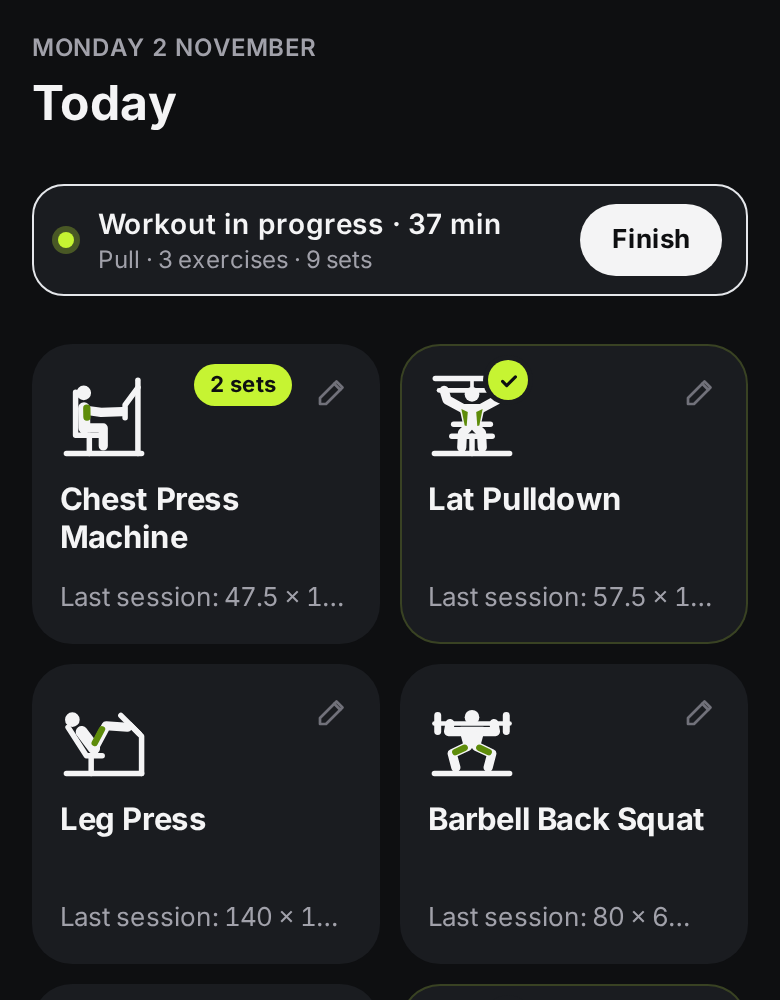
Pick your exercises.
Add from a library of 100, each with its own icon, or create your own. They become big tiles on your Today screen.
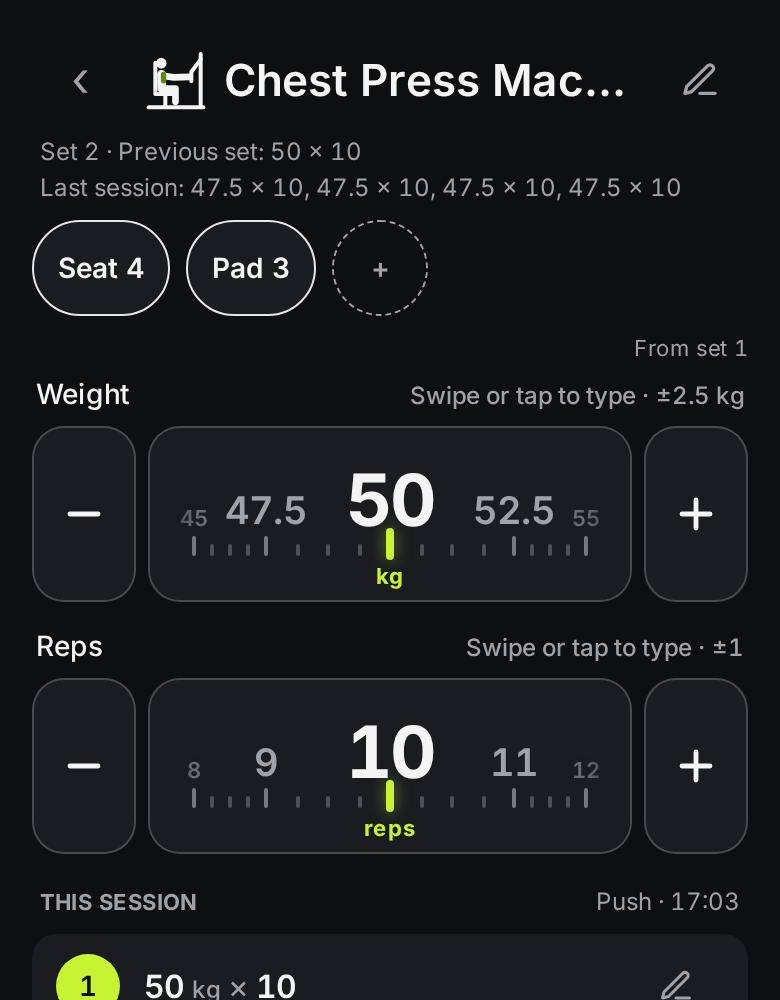
Log your set.
Weight and reps are already filled in from last time. Same again? Tap Log set. Small change? Nudge the + or −.
Rest, then repeat.
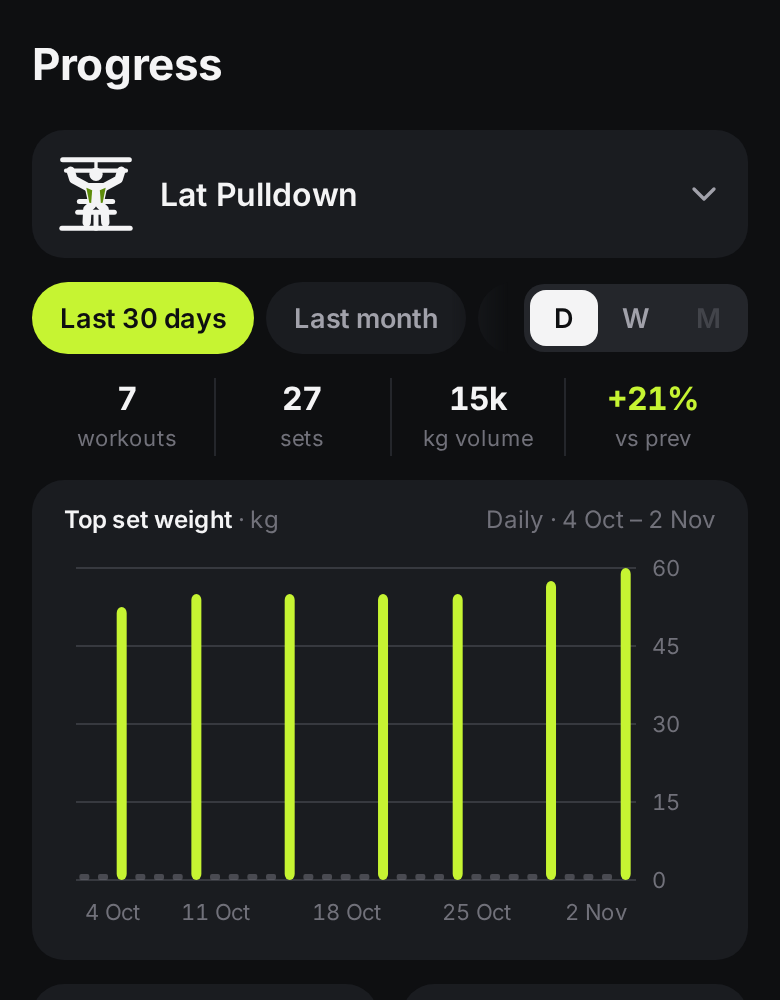
The rest timer starts on its own. Your history and progress charts build up as you go.


Everything you need between sets. Nothing you don't.
One-tap repeat sets.
Prefilled from last time. Same set again is one tap.
Your machine settings, saved.
Seat 4, pad 3, pin 7. Saved per machine and shown at the top of the log screen, so you set up right first time.
Warm-ups that don't mess up your graphs.
Switch on warm-up tracking in Profile, then flag a set as a warm-up and it's kept out of charts and PRs.
A rest timer that stays out of the way.
A slim bar that starts itself. Nudge it ±30s, skip it, or tap to change it. No pop-ups mid-set.
Progress you can actually read.
Top set, estimated 1RM and volume, by day, week or month, with PRs marked in lime.
Works with no signal.
Basement gym? No problem. PinRep works fully offline once it's loaded.
Also: kg or lb · bodyweight and timed exercises · dark or light theme · screen stays awake while you train.
Free. No ads. No trial periods.
- Start logging straight away. Sign in later to sync. Everything you log is stored on your phone, not on our servers. Export a backup as JSON plus a CSV spreadsheet any time from Profile › Backup. Only the JSON file can be restored.
- We count usage like "a set was logged" to see what's working. That can include exercise names, weights, reps and set type — never notes. If you sign in and agree, usage may be linked to your account. Switch it off in Profile › Privacy.
- Free now. No ads, ever. Optional extras may come later, but keeping your data safe will always be free.
Put PinRep on your home screen
It installs like an app, opens full screen and works offline. It takes about 10 seconds.
- 1Open pinrep.app in Chrome.
- 2Tap Install when it pops up, or tap the ⋮ menu › Install app (or Add to Home screen).
- 3Open PinRep from your home screen.
- 1Open pinrep.app in Safari.
- 2Tap the Share button (the square with an arrow pointing up).
- 3Scroll down and tap Add to Home Screen, then Add.
- 4Open PinRep from your home screen, not from Safari.
Why bother? On iPhone, Safari can clear data for websites you haven't opened in a while. Once PinRep is on your Home Screen, your workouts are kept safely. Exporting a backup now and then is still a good idea.
Built by a lifter, for lifters
"I built PinRep because I was fed up typing between sets and forgetting where the seat went on every machine. It's free, it's fast, and I'm improving it every week based on feedback from lifters like you."PinRep's founder
Questions
Is PinRep free?
Yes. It's free, with no ads, ever. We may add optional extras later, but logging your workouts and keeping your data safe will always be free.
Do I need an account?
Start logging right away — your workouts are stored on your phone. Create a free account (Google or email) to back up and sync automatically across devices.
Where is my data stored?
On your phone first. Until you sign in, nothing is uploaded. Sign in to sync across devices. You can also export a backup as JSON plus a CSV spreadsheet any time from Profile › Backup. Only the JSON file can be restored.
Is it on the App Store or Google Play?
Not yet. PinRep is a web app you install from your browser (see "Put PinRep on your home screen"). Store versions are planned for later.
Does it work without signal?
Yes. Once you've opened it once, PinRep works fully offline, so a basement gym is fine.
Does it work on iPhone?
Yes. Open pinrep.app in Safari, tap Share › Add to Home Screen, and open it from there.
Can I use kg or lb?
Both. It's kg by default, and you can switch in Profile. You can also set your own weight increments.
What can I track?
Weight and reps, bodyweight exercises (with optional added weight), and timed exercises like planks or cardio, with optional distance.
Does it have workout plans or routines?
Not yet. You pick your favourite exercises and log them. Routines are on the list.
Can I import my history from another app?
Not yet, but it's on the list.
What do you track about me?
Optional usage events help us improve PinRep — for example that a workout finished, plus exercise names, weights (kg), reps and set type. Notes are never collected. If you sign in and agree, usage can be linked to your account email. Processing uses PostHog in the US (SCCs / UK addendum). pinrep.com may also count visits. Turn it off in Profile › Privacy.
Will I lose my data if I change phone?
Create a free account to sync automatically across devices, or export a JSON backup from Profile › Backup and restore it on the new phone.
How do I suggest a feature or report a bug?
Got an idea or found a bug? Tap Feedback in Profile.